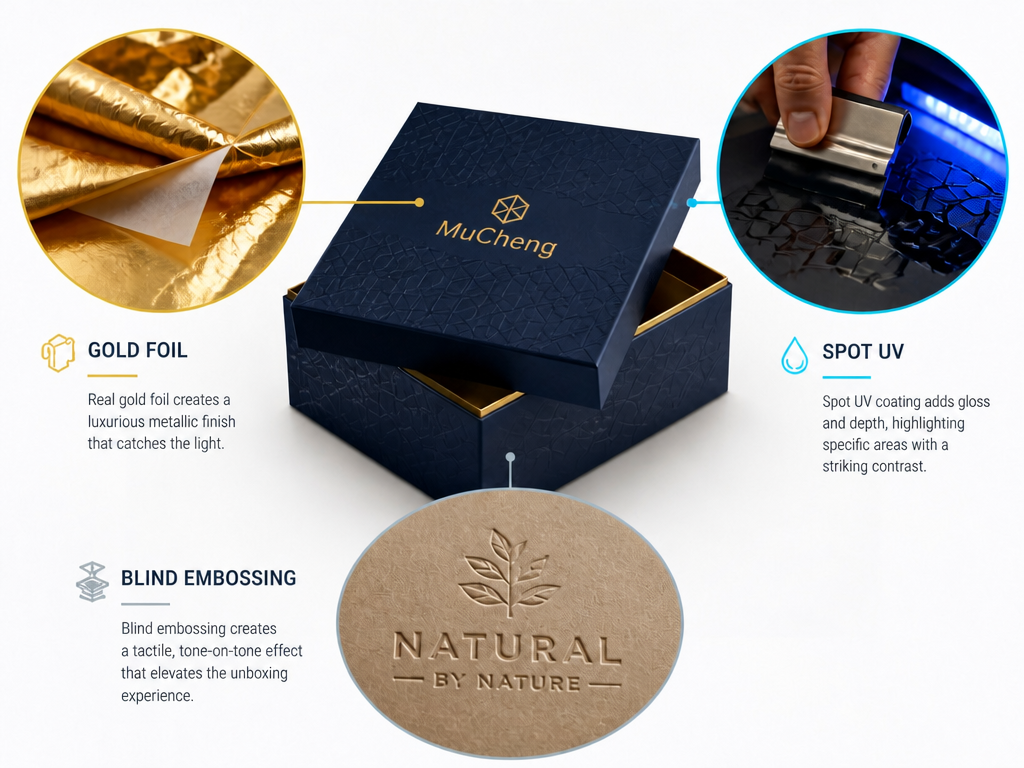
Meta description: Choosing between foil stamping, UV coating, and embossing for your custom gift box? This guide compares all three — with a file preparation checklist that prevents costly reprints.
Intro: Pick the wrong finish and your box looks cheap no matter how good the structural design is. Pick the right one and a $1.20 box sits on shelf like it belongs next to a $5 product. Foil stamping, UV coating, and embossing are the three finishing techniques you will encounter most often in custom gift box production. Each one changes how your packaging looks, feels, and costs — and each one requires different design files. This guide breaks down how they work, when to use which, and exactly what to send your factory so nothing comes back wrong.
How Each Finish Actually Works
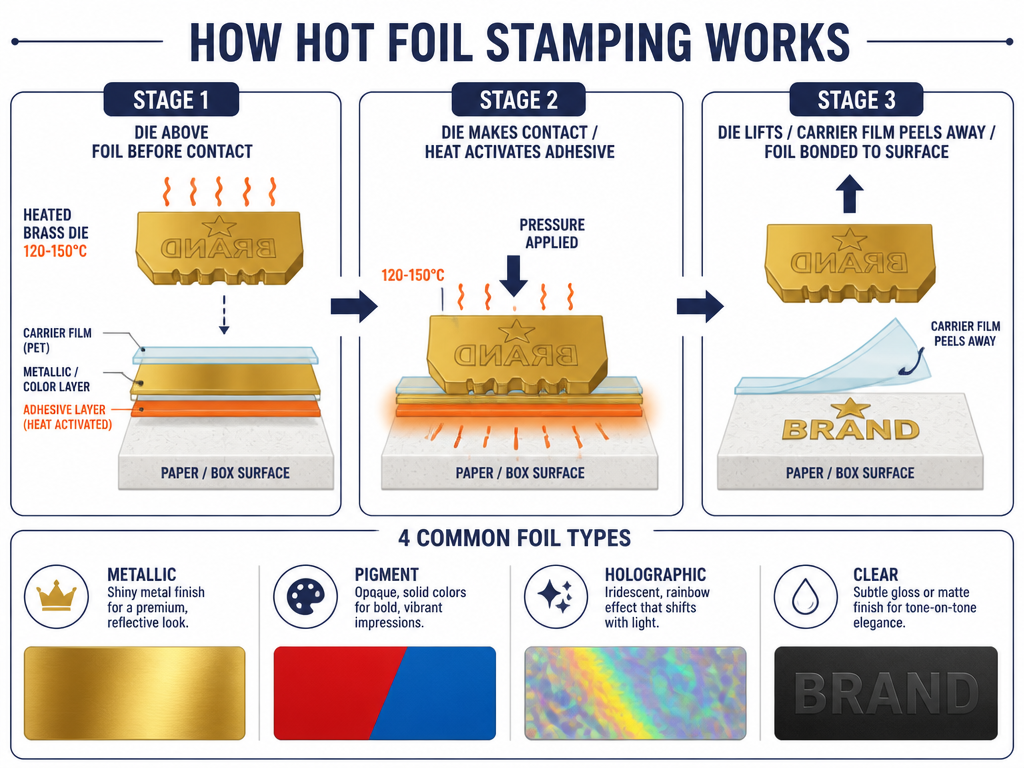
Foil Stamping (Hot Stamping)
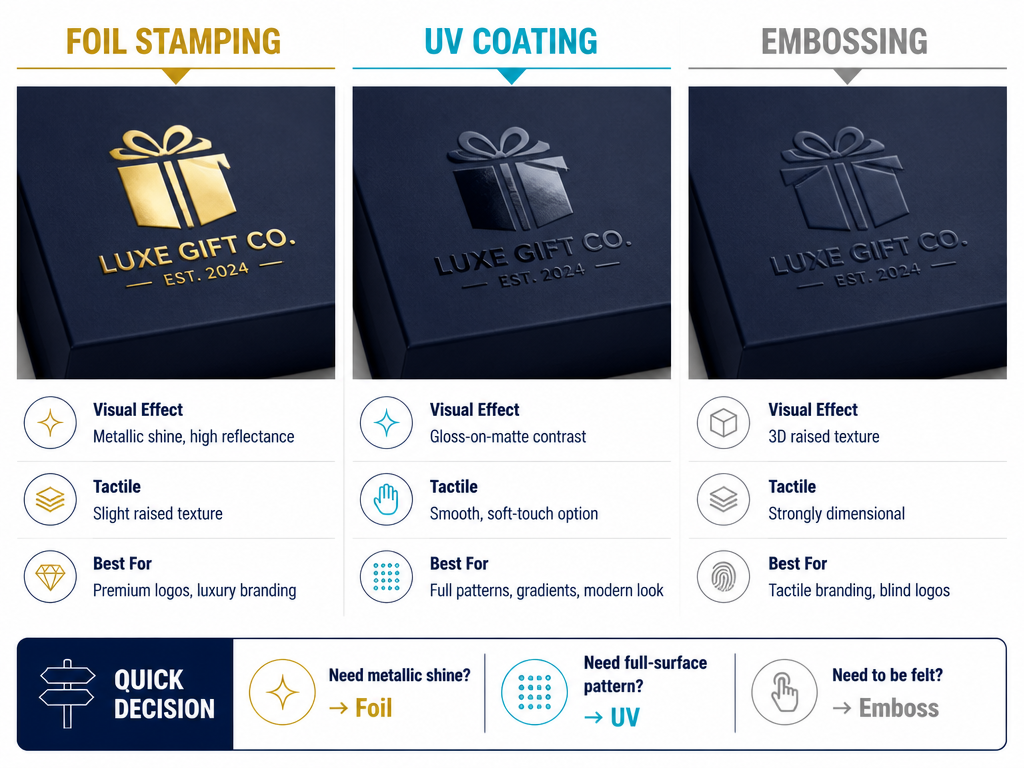
A heated die (120–150°C) presses a thin metallic or pigmented foil film onto the box surface. The heat activates an adhesive layer on the back of the foil, bonding it to the paper. When the die lifts, the foil stays where the die made contact.
The die is custom-made — usually from brass or magnesium — and is a one-time tooling cost. Fine lines, small text, and intricate patterns are all achievable because the die is CNC-engraved from vector artwork.
Common foil types:
- Metallic foil (gold, silver, copper, holographic)
- Pigment foil (solid colors — white, black, red, Pantone-matched)
- Holographic foil (security and decorative applications)
- Clear foil (subtle gloss effect on matte surfaces)
UV Coating
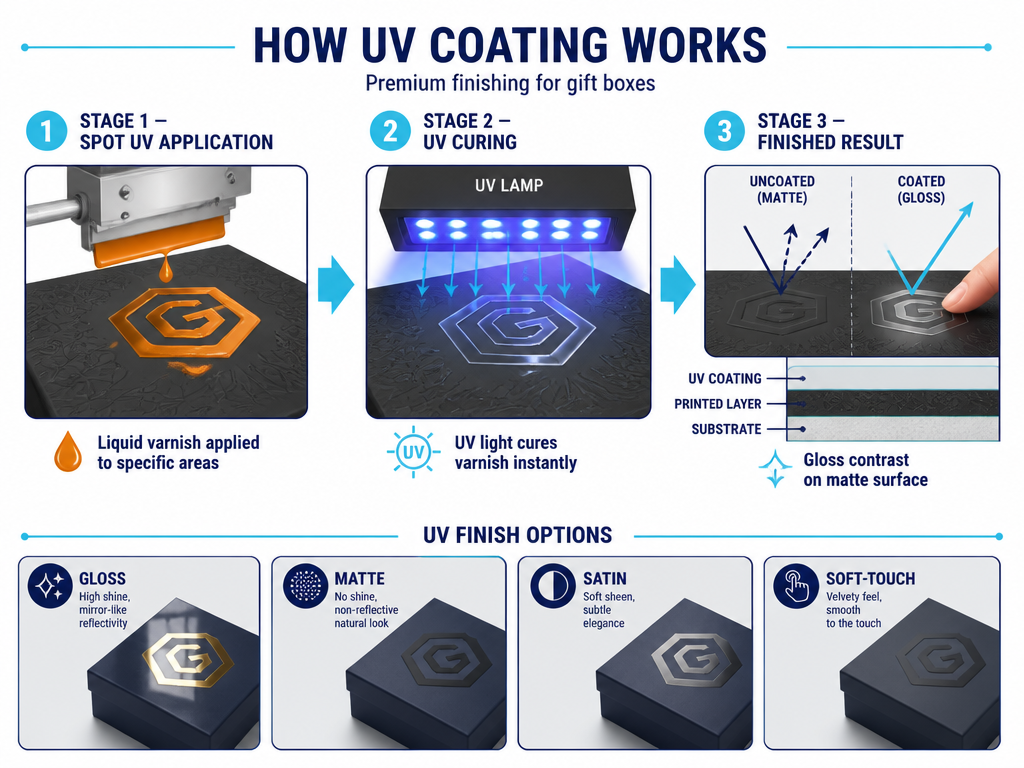
A liquid varnish applied to the printed surface and then cured instantly under ultraviolet light. Two application modes:
- Spot UV — applied only to specific areas using a silk-screen or inkjet head. Creates a targeted gloss or matte contrast against the surrounding surface.
- Flood UV — applied across the entire surface. Functions as a protective topcoat with a uniform finish.
UV coating does not require a metal die. The pattern is digital, which makes it faster and more cost-effective for complex or full-coverage designs. Finish options include gloss, matte, satin, and soft-touch.
Key difference from foil: UV coating adds a surface layer. It does not bond a separate material to the paper. This means it cannot replicate the metallic reflectance of foil, but it offers more flexibility in texture and pattern complexity.
Embossing & Debossing
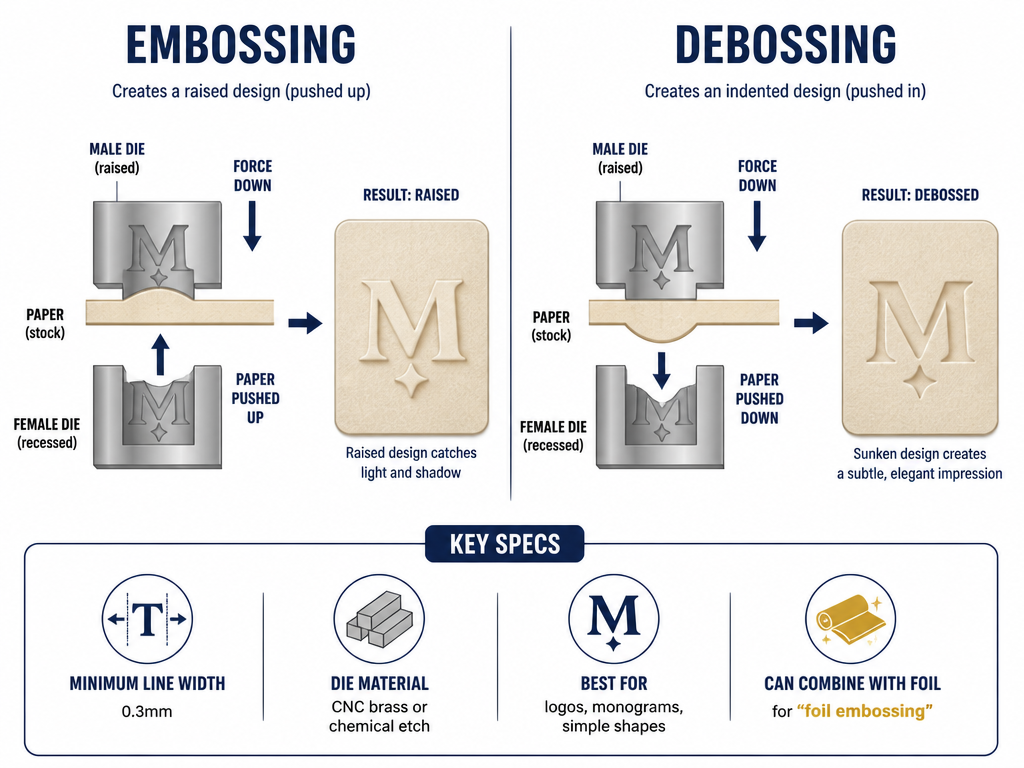
Embossing presses the paper upward between a male die (raised) and a female die (recessed), creating a three-dimensional raised area. Debossing reverses the direction — the design is pressed inward.
Neither process uses ink or foil on its own. The effect is purely structural — light and shadow define the design. But both can be combined with foil (foil embossing) or left as a blind effect for a tactile, understated look.
Dies are typically CNC-machined from brass for precision or chemically etched for simpler designs. Minimum line width is typically 0.3mm, and large flat areas risk uneven pressure and paper distortion.
Choosing the Right Finish: Comparison
| Factor | Foil Stamping | UV Coating | Embossing / Debossing |
|---|---|---|---|
| Visual effect | Metallic or solid-color shine. High reflectance. | Gloss, matte, or soft-touch. No metallic option. | Dimensional texture. Shadow and light define the design. |
| Tactile feel | Slight raised texture from foil layer. | Smooth. Soft-touch UV adds a velvet feel. | Strongly dimensional. Fingers read the design. |
| Tooling cost | Medium to high. Custom brass/magnesium die per design. | Low to none. Digital application — no die. | Medium to high. Custom male/female die pair. |
| Per-unit cost | Medium. Higher for large foil areas. | Low. Spot UV adds minimal cost; flood UV is cheap at scale. | Medium. Increases with design size and complexity. |
| Design complexity | Best for logos, text, icons, fine lines. Limited on gradients. | Best for full patterns, photographic detail, gradients. No size limit. | Best for logos, monograms, simple graphic shapes. Limited on fine detail. |
| Minimum line width | 0.3mm (varies by die maker) | No physical limit (digital) | 0.3mm practical minimum |
| Durability | High. Foil bonds strongly to laminated or coated surfaces. | Medium to high. Flood UV protects well; spot UV can wear at edges. | Permanent. Structural deformation does not wear off. |
| Best for | Premium logos, luxury branding, metallic accents | Full-coverage patterns, protective topcoat, modern aesthetic | Tactile branding, blind logos, monograms |
Quick Decision Rule
- Need metallic shine? → Foil stamping. UV cannot replicate it.
- Need a full-surface pattern or gradient? → UV coating. Digital, scalable, cost-effective at any complexity.
- Need the design to be felt, not just seen? → Embossing or debossing. The dimensionality is physical, not visual.
-
Need metallic + texture? → Foil embossing. Combines both processes in one pass.
Pattern Type × Finish Match
Fine Lines and Small Text (Under 5mm height)
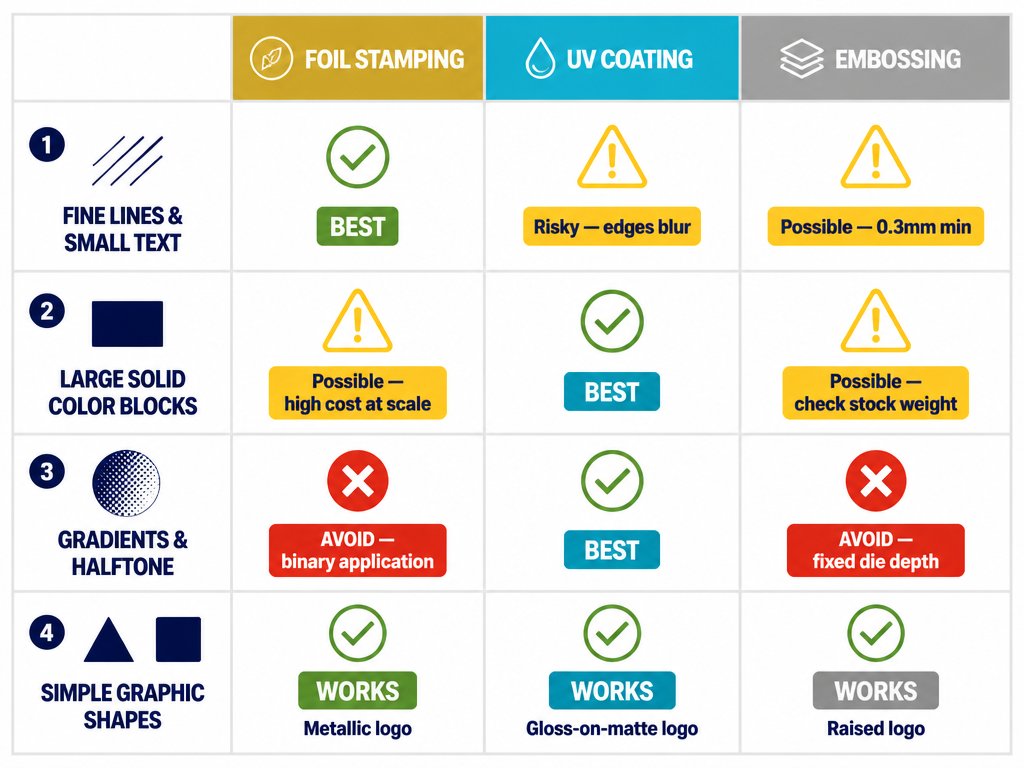
Best: Foil stamping. The CNC-engraved die handles thin strokes and small serifs accurately. Pigment foil in black or white on a dark substrate is a common high-contrast combination.
Possible: Embossing, but with limits. Minimum line width around 0.3mm. Thin text debossed into soft paper can lose definition. Avoid on stocks below 250gsm.
Avoid: Spot UV on very thin lines — edges tend to blur during application, and the gloss contrast is hard to read on fine detail.
Large Solid Color Blocks
Best: UV coating (flood or spot). Clean, even coverage across large areas. Flood UV gloss over a printed solid creates a deep, saturated look.
Possible: Foil stamping works for solid metallic blocks, but large foil areas increase cost and risk of imperfect adhesion. If the foil area exceeds 40% of the face, discuss cost implications with your factory first.
Possible: Embossing a large solid area creates a broad raised surface. Effective for minimalist designs but risky on thin board — check with your structural engineer.
Gradients and Halftone Patterns
Best: UV coating. Spot UV can replicate photographic gradients and halftone screens because the application is digital.
Avoid: Foil stamping. Foil is a binary application — the die either makes contact or it does not. You cannot produce a true gradient with standard hot stamping.
Avoid: Embossing gradients. The die is a fixed depth. Transitioning from raised to flat within a single design requires a custom-machined graduated die — expensive and rarely practical.
Simple Graphic Shapes (Icons, Monograms, Logos)
All three processes work well. Choose based on the effect you want:
- Metallic logo → Foil stamping
- Gloss-on-matte logo → Spot UV
- Raised logo → Embossing
-
Maximum premium → Foil embossing (foil + raised texture combined)
File Preparation Guide
This is where most delays happen. Submitting the wrong file format or missing a spot color layer means your factory has to request revisions, and your timeline takes the hit.
Foil Stamping Files
| Requirement | Specification |
|---|---|
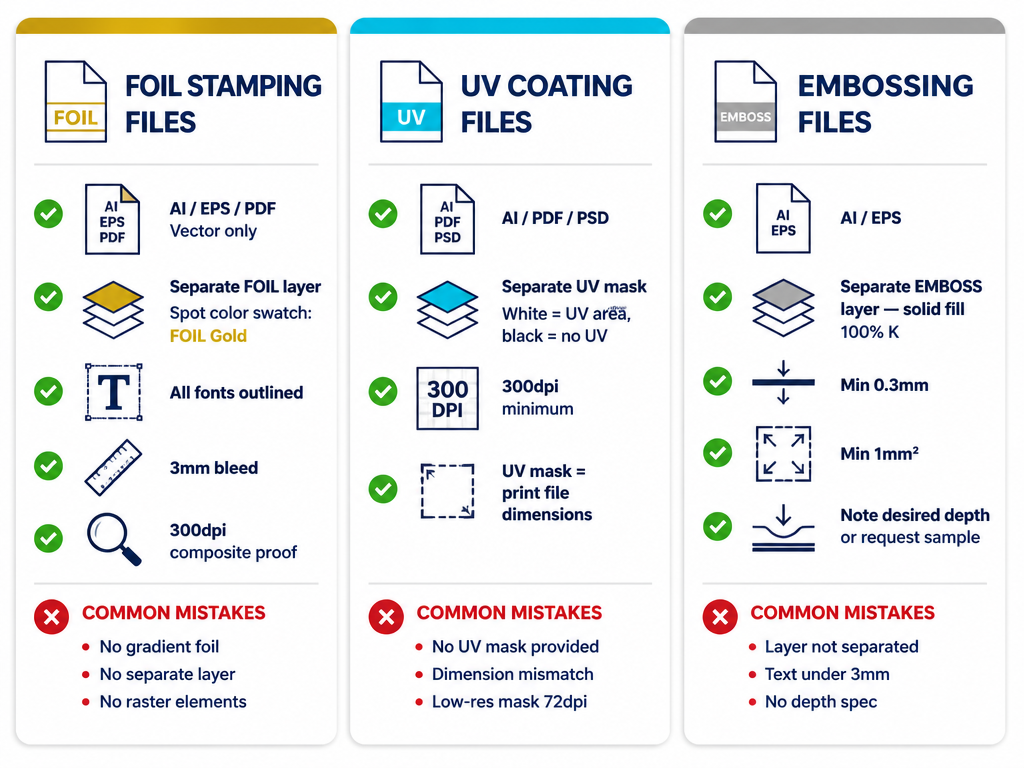
| File format | Adobe Illustrator (.ai) or EPS (.eps). PDF acceptable if all fonts are outlined and images embedded. |
| Artwork type | Vector only. No raster/bitmap elements for foil areas. |
| Foil layer | Separate layer, labeled "FOIL" or "Hot Stamp." |
| Spot color | Foil areas assigned to a spot color (not CMYK). Name the swatch: "FOIL Gold," "FOIL Silver," etc. |
| Fonts | All text converted to outlines / curves. No live text. |
| Bleed | 3mm (0.125") bleed on all sides beyond the trim line. |
| Resolution | Minimum 300dpi for any raster elements in the composite proof (foil areas must still be vector). |
| Composite proof | High-resolution PDF showing the final visual with crop marks and bleed. |
| Registration | Foil layer registered precisely to the printed artwork. Same document dimensions and trim marks. |
Common mistakes:
- Simulating foil with a gradient or metallic effect in the CMYK artwork. The factory needs the actual foil area, not a visual approximation.
- Sending a single PDF with foil areas indicated by color only — no separate layer.
- Using raster elements (JPEG, PNG, PSD) for the foil artwork. The die is cut from vector paths.
UV Coating Files
| Requirement | Specification |
|---|---|
| File format | Adobe Illustrator (.ai), PDF, or high-resolution PSD. |
| UV layer | Separate layer or file labeled "UV" or "Spot UV." White = UV area, black = no UV (confirm with factory). |
| Resolution | Minimum 300dpi for the UV mask. |
| Bleed | 3mm (0.125") bleed if UV extends to the edge. |
| Alignment | UV mask aligned precisely to the printed artwork. Identical document dimensions. |
For flood UV: No separate mask needed. Specify "flood UV gloss" or "flood UV matte" on the production brief.
Common mistakes:
- No UV mask provided — factory has to guess which areas get the coating.
- UV mask does not match the print file dimensions, causing registration misalignment.
- Low-resolution mask (72dpi) producing jagged UV edges.
Embossing / Debossing Files
| Requirement | Specification |
|---|---|
| File format | Adobe Illustrator (.ai) or EPS (.eps) with outlined fonts. |
| Artwork type | Vector only. Simple, closed shapes work best. |
| Emboss layer | Separate layer labeled "EMBOSS" or "DEBOSS." Solid fill (100% K or designated spot color) indicates the raised/recessed area. |
| Minimum line width | 0.3mm. Thinner lines risk incomplete impression or paper tearing. |
| Minimum closed shape | 1mm². Very small shapes may not register cleanly. |
| Die depth guidance | Include a note specifying desired depth (e.g., "0.5mm raise") or request a sample die strike. |
| Bleed | 3mm (0.125") bleed if emboss extends to the edge. |
Common mistakes:
- Emboss layer not separated — factory has to extract the area from composite artwork.
- Requesting emboss on very thin text (under 3mm cap height).
- No depth specification — factory defaults to a standard depth that may be wrong for the stock.
Combined Finishes (Foil + Emboss, UV + Emboss, etc.)
Each finish gets its own dedicated layer:
- "FOIL" layer — vector, spot color
- "EMBOSS" layer — vector, solid fill
- "UV" layer — raster or vector, high-contrast mask
- "PRINT" layer — standard CMYK artwork
All layers share the same document dimensions and trim marks. Submit as a single package file (.ai package or .zip with linked assets) plus a composite PDF proof.
Frequently Asked Questions
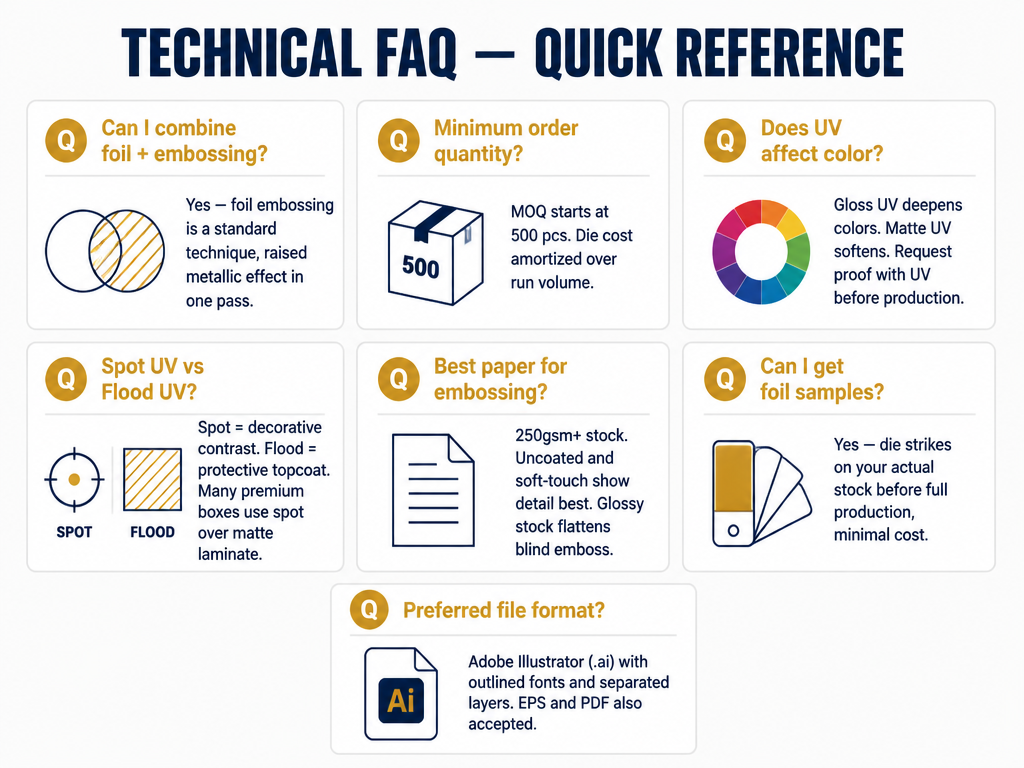
Can I combine foil stamping and embossing on the same area? Yes. Foil embossing is a standard technique — the foil is applied and embossed in a single pass through a heated die. It produces a raised metallic effect and is one of the most common premium finishes for luxury gift boxes.
What is the minimum order quantity for foil-stamped boxes? At MuCheng, our MOQ for custom foil-stamped boxes starts at 500 pieces. The die is a one-time tooling cost amortized over the run, so higher volumes reduce the per-unit premium.
Does UV coating affect color perception? Gloss UV deepens colors and increases contrast. Matte UV softens the appearance and reduces glare. If color accuracy is critical (e.g., brand Pantone matching), request a printed proof with UV applied before confirming production.
How do I choose between spot UV and flood UV? Spot UV adds contrast and visual interest — it is decorative. Flood UV protects the surface — it is functional. Many premium boxes use spot UV over a matte-laminated base for a gloss-on-matte effect. Flood UV is more common on retail packaging that needs scratch resistance.
What paper stock works best for embossing? Stocks of 250gsm or heavier hold embossed detail well. Uncoated and soft-touch stocks show embossing most clearly because the surface texture catches light. Very glossy stocks can flatten the visual impact of a blind emboss.
Can I get a foil sample before committing to production? Yes. We provide die strikes (foil samples on your actual stock) before full production. This lets you verify the foil color, adhesion, and detail quality at minimal cost.
What file format does MuCheng prefer?
Adobe Illustrator (.ai) with outlined fonts and separated layers is preferred. EPS and high-resolution PDF are also accepted. PSD works for UV masks, but vector is always preferred for foil and emboss artwork.
Ready to Finish Your Custom Gift Box?
Tell us your design direction — we will recommend the right finish, confirm feasibility, and provide a free 3D mockup before sampling.